Examples#
Below are some simple examples you can follow to understand how OSeMOSYS Global works.
Caution
Before running any examples, ensure you first follow our installation instructions and activate the mamba environment.
```bash
(base) ~/osemosys_global$ mamba activate osemosys-global
(osemosys-global) ~/osemosys_global$
```
Warning
If you installed CPLEX or Gurobi instead of CBC, you must first change this in
the configuration file at config/config.yaml as below
solver: "gurobi"
Example 1#
Goal: Run the workflow with default settings. This will produce a model of India from 2021 to 2050 and solve it using CBC.
Run the command
snakemake -j6. The time to build and solve the model will vary depending on your computer, but in general, this example will finish within minutes.(osemosys-global) ~/osemosys_global$ snakemake -j6
Tip
The
-j6command will instruct Snakemake to use six cores. If your want to restrict this, change the number after the-jto specify the number of cores. For example, the commandsnakemake -j2will run the workflow using 2 cores. See snakemake’s documentation for more information.Navigate to the newly created
results/folder. All available automatically generated results are summarized below.osemosys_global └── results # Will appear after running the workflow ├── data # Global CSV OSeMOSYS data ├── figs │ ├── ... # Global demand projections └── India # Name of scenario ├── data # Scenario input CSV data ├── figures # Result figures │ ├── GenerationAnnual.html │ ├── GenerationHourly.html │ ├── TotalCapacityAnnual.html │ ├── TransmissionCapacity2050.jpg │ └── TransmissionFlow2050.jpg ├── result_summaries # Auto generated result tables │ ├── AnnualEmissionIntensity.csv │ ├── AnnualEmissionIntensityGlobal.csv │ ├── AnnualExportTradeFlowsCountry.csv │ ├── AnnualExportTradeFlowsNode.csv │ ├── AnnualImportTradeFlowsCountry.csv │ ├── AnnualImportTradeFlowsNode.csv │ ├── AnnualNetTradeFlowsCountry.csv │ ├── AnnualNetTradeFlowsNode.csv │ ├── AnnualTotalTradeFlowsCountry.csv │ ├── AnnualTotalTradeFlowsNode.csv │ ├── GenerationSharesCountry.csv │ ├── GenerationSharesGlobal.csv │ ├── GenerationSharesNode.csv │ ├── Metrics.csv │ ├── PowerCapacityCountry.csv │ ├── PowerCapacityNode.csv │ ├── PowerCostCountry.csv │ ├── PowerCostGlobal.csv │ ├── PowerCostNode.csv │ ├── TotalCostCountry.csv │ ├── TotalCostGlobal.csv │ ├── TotalCostNode.csv │ ├── TradeFlowsCountry.csv │ ├── TradeFlowsNode.csv │ ├── TransmissionCapacityCountry.csv │ └── TransmissionCapacityNode.csv ├── results # Scenario result CSV data └── India.txt # Scenario OSeMOSYS data file
File - figures
Description
GenerationAnnual.htmlPlot of system level annual generation by technology
GenerationHourly.htmlPlot of system level technology generation by timeslice
TotalCapacityAnnual.htmlPlot of system level annual capacity by technology
TransmissionCapacityXXXX.jpgTransmission capacity plot for last year of model
TransmissionFlowXXXX.jpgTransmission flow plot for last year of model
File - result_summaries
Description
AnnualEmissionIntensity.csvCountry level annual emission intensity (gCO2/kWh)
AnnualEmissionIntensityGlobal.csvSystem level annual emission intensity (gCO2/kWh)
AnnualExportTradeFlowsCountry.csvCountry level annual electricity exports from node_1 to node_2 (PJ)
AnnualExportTradeFlowsNode.csvNodal level annual electricity exports from node_1 to node_2 (PJ)
AnnualImportTradeFlowsCountry.csvCountry level annual electricity exports from node_2 to node_1 (PJ)
AnnualImportTradeFlowsNode.csvNodal level annual electricity exports from node_2 to node_1 (PJ)
AnnualNetTradeFlowsCountry.csvCountry level annual net trade from node_1 to node_2 (PJ)
AnnualNetTradeFlowsNode.csvNodal level annual net trade from node_1 to node_2 (PJ)
AnnualTotalTradeFlowsCountry.csvCountry level annual total trade between node_1 and node_2 (PJ)
AnnualTotalTradeFlowsNode.csvNodal level annual total trade between node_1 and node_2 (PJ)
GenerationSharesCountry.csvCountry level annual generation shares per generator category (%)
GenerationSharesGlobal.csvSystem level annual generation shares per generator category (%)
GenerationSharesNode.csvNodal level annual generation shares per generator category (%)
Metrics.csvSummary statistics for the full model horizon
PowerCapacityCountry.csvCountry level annual capacity by technology (GW)
PowerCapacityNode.csvNodal level annual capacity by technology (GW)
PowerCostCountry.csvCountry level annual relative system cost ($/MWh, Total Costs / Demand)
PowerCostGlobal.csvSystem level annual relative system cost ($/MWh, Total Costs / Demand)
PowerCostNode.csvNodal level annual relative system cost ($/MWh, Total Costs / Demand)
TotalCostCountry.csvCountry level total system cost ($M)
TotalCostGlobal.csvSystem level total system cost ($M)
TotalCostNode.csvNodal level total system cost ($M)
TradeFlowsCountry.csvCountry level electricity trade by timeslice (PJ)
TradeFlowsNode.csvNodal level electricity trade by timeslice (PJ)
TransmissionCapacityCountry.csvCountry level annual transmission capacity (GW)
TransmissionCapacityNode.csvNodal level annual transmission capacity (GW)
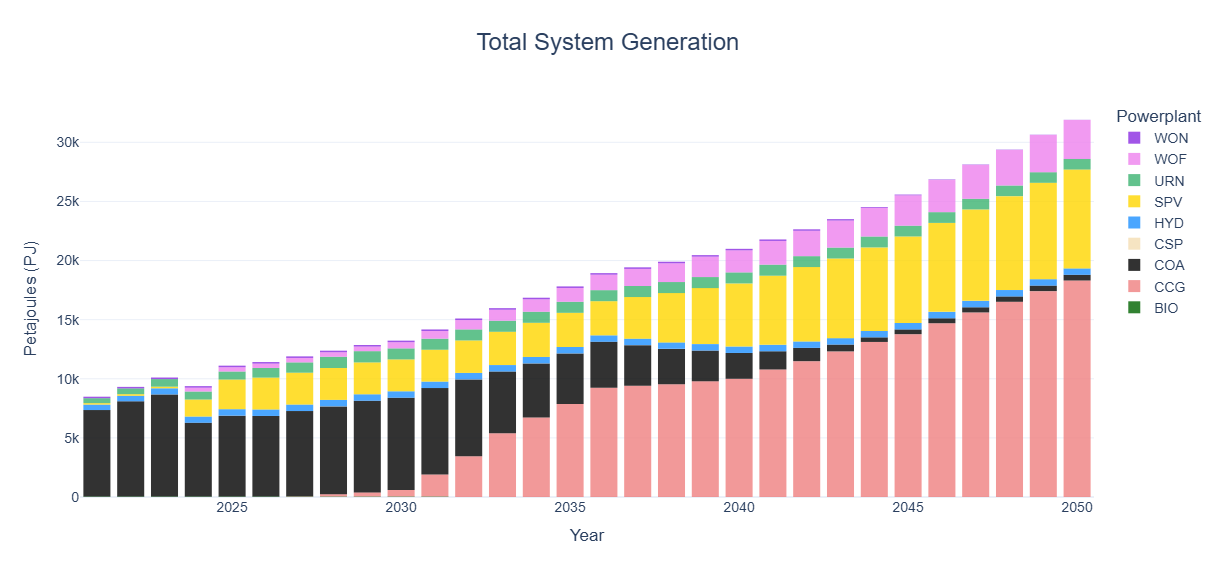
View system level capacity and generation results.
Caution
These results are used to showcase the capabilities of OSeMOSYS Global. The actual energy supply mix results will need further analysis, such as removing technology bias though implementing resource limits on solar-PV (SPV) and CCG (Combined Cycle Gas).

Tip
These plots are interactive! Hover over the bars to view values, or double click on a power plant in the legend to single it out.
View demand projections results in the file
results/figs/projection.png. Grey dots represent historical country level values for countries in Asia and the coloured dots show projected values.
Example 2#
Goal: Modify the model geographic scope, temporal settings, emission penalty and generator build rates for CCG and SPV in India.
The goal of this scenario will be to change the geographic scope to add Bangladesh, Bhutan, and Nepal to the model. Moreover, we will change the model horizon to be from 2023-2050 and increase the number of time slices and seasons per year. We also set build rates for CCG at 10 GW/yr and to 5%/yr of the total solar PV potential in India. Finally, we will ensure cross border trade is allowed, set the emission penalty to $50/T, and create country level result plots.
Navigate to and open the file
config/config.yamlChange the scenario name to BBIN (Bangladesh, Bhutan, India, and Nepal)
scenario: 'BBIN'
Change the geographic scope to include the mentioned countries.
geographic_scope:
  - 'IND'
  - 'BGD'
  - 'BTN'
  - 'NPL'
Change the model horizon to be from 2023 to 2050. Both numbers are inclusive.
startYear: 2023
endYear: 2050
Change the number of day parts to represent three even 8 hour segments per day. The start number is inclusive, while the end number is exclusive.
dayparts:
  D1: [1, 9]
  D2: [9, 17]
  D3: [17, 25]
Change the number of seasons to represent 3 equally spaced days. All numbers are inclusive.
seasons:
  S1: [1, 2, 3, 4]
  S2: [5, 6, 7, 8]
  S3: [9, 10, 11, 12]
Tip
A timeslice structure of 3 seasons and 3 dayparts will result in a model with 9 timeslices per year; 3 representative days each with 3 timeslices.
See the OSeMOSYS documentation has more information on the OSeMOSYS timeslice parameters.
Ensure the
crossborderTradeparameter is set toTruecrossborderTrade: True
Change the emission penalty to
50$/T and change the START_YEAR parameter to2023.emission_penalty: - ["CO2", "IND", 2023, 2050, 50] - ["CO2", "BGD", 2023, 2050, 50] - ["CO2", "BTN", 2023, 2050, 50] - ["CO2", "NPL", 2023, 2050, 50]
Adjust the generation build rates for CCG and SPV for India in
data/custom/powerplant_build_rates.csvinGW.TYPE
COUNTRY
METHOD
MAX_BUILD
START_YEAR
END_YEAR
CCG
IND
ABS
10
2024
2050
SPV
IND
PCT
5
2024
2050
Tip
Generator build rates can be set in absolute values (ABS) in GW or as a relative value (PCT) for renewables, where the % value set equals x % of the total resource potential for the specific technology and country. For the default OSeMOSYS Global nodes, resource potentials exist for HYD, SPV, WOF & WON. Custom resource potentials for all nodes (default and custom) and all renewables can be set in
resources/data/custom/RE_potentials.csv.Run the command
snakemake -j6(osemosys-global) ~/osemosys_global$ snakemake -j6
Tip
If you run into any issues with the workflow, run the command
snakemake clean -c. This will delete any auto generated files and bring you back to a clean start.Navigate to the
results/folder to view results from this model run.Notice how under
figures/, there is now a folder for each country. By setting thecrossborderTradeparameter to be true, we tell the workflow to create out both system level and country level plots.osemosys_global ├── results │ ├── data # Global CSV OSeMOSYS data │ ├── figs │ │ ├── ... # Global demand projections │ ├── BBIN # Name of scenario │ │ ├── data # Scenario input CSV data │ │ ├── figures # Result figures │ │ │ ├── BGD │ │ │ │ ├── GenerationAnnual.html │ │ │ │ ├── TotalCapacityAnnual.html │ │ │ ├── BTN │ │ │ │ ├── GenerationAnnual.html │ │ │ │ ├── TotalCapacityAnnual.html │ │ │ ├── IND │ │ │ │ ├── GenerationAnnual.html │ │ │ │ ├── TotalCapacityAnnual.html │ │ │ ├── NPL │ │ │ │ ├── GenerationAnnual.html │ │ │ │ ├── TotalCapacityAnnual.html │ │ │ ├── GenerationAnnual.html │ │ │ ├── GenerationHourly.html │ │ │ ├── TotalCapacityAnnual.html │ │ │ ├── TransmissionCapacity2050.jpg │ │ │ ├── TransmissionFlow2050.jpg │ │ ├── result_summaries # Auto generated result tables │ │ ├── results # Scenario result CSV data │ │ ├── BBIN.txt # Scenario OSeMOSYS data file └── ...
Note
If you don’t clean the model results, the previous scenario results are saved as long as you change the scenario name.
View system level 2050 hourly generation results by viewing the file
results/BBIN/figures/GenerationHourly.html
Warning
When running the example model the below message is reported once the workflow is completed. Use of the BCK technology indicates that there is a supply shortage for the respective node (BGD).
The following Backstop Technologies are being used:
[‘PWRBCKBGDXX’]
Tip
By default time-series data in the OSeMOSYS Global workflow is reported in UTC+0. If you want to report values in a time-zone that is more applicable to the geographical scope for which the model is build you can use the
timeshiftparameter in the configuration file.
Example 3#
Goal: Validate the BBIN example and improve its accuracy based on historical data and adjust the model time-zone.
The goal of this scenario will be to rerun the BBIN scenario (example 2), except we will adjust some of its input parameters by comparing model outputs to historical data from benchmark datasets. We will furthermore adjust the time-zone to represent the local system.
Change the scenario name
scenario: 'BBINvalidated'
Change the
timeshiftparamater to UTC+6timeshift: 6
View the capacity validation chart for BGD for 2023 located in
results/BBIN/validation/BGD/capacity/ember.png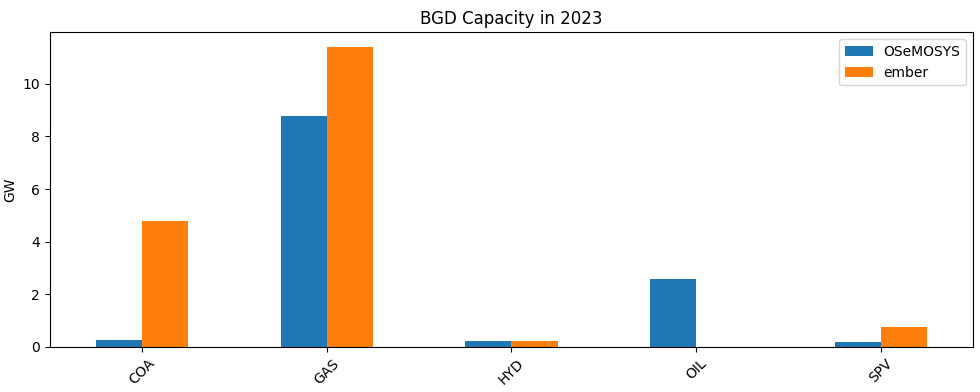
We can see that there is a significant capacity shortage for COA (± 4.5 GW), GAS (± 3 GW) and SPV (± 0.5 GW) in the OSeMOSYS Global outputs compared to the benchmark dataset (EMBER yearly electricity data).
Warning
The default data for generator capacity in OSeMOSYS Global for more recent years is currently not up to date. Validating and adjusting input data is recommended. Updating the OSeMOSYS Global workflow to more recent datasets is work in progress.
Adjust the existing capacities for COA, CCG and SPV for Bangladesh in
resources/data/custom/residual_capacity.csvinMW. We will set values equal to the reported values in the benchmark dataset Ember yearly electricity data in MW values.CUSTOM_NODE
FUEL_TYPE
START_YEAR
END_YEAR
CAPACITY
BGDXX
COA
2000
2030
4770
BGDXX
CCG
2000
2030
11390
BGDXX
SPV
2010
2040
770
Run the command
snakemake -j6(osemosys-global) ~/osemosys_global$ snakemake -j6
Have another look at the validation chart for BGD for 2023 located in
results/BBINvalidated/validation/BGD/capacity/ember.png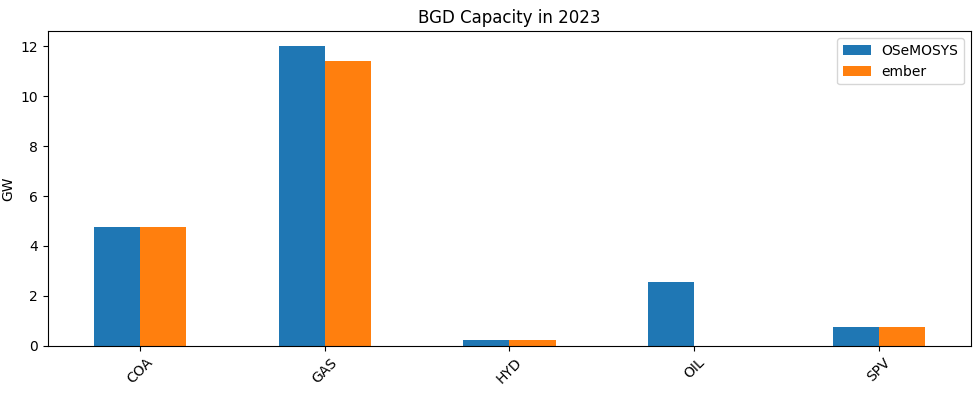
Warning
Eventhough the capacities are updated, we still see the use of the BCK technology in Bangladesh.
The following Backstop Technologies are being used:
[‘PWRBCKBGDXX’]
Tip
Further input changes can be made to adjust the total available supply. For example, by changing technology availability factors in
resources/data/custom/availability_factors.csvor by changing capacity factors for SPV inresources/data/custom/RE_profiles_SPV.csv. However, since there are limited renewables in Bangladesh in 2023 (the year of the supply shortage) and other technologies are used at a maximum rate it is an indicator that the projected electricity demand is overestimated.Adjust the electricity demand for Bangladesh in 2023 in
resources/data/custom/specified_annual_demand.csv. We will set values equal to the reported values in the benchmark dataset Ember yearly electricity data converted to PJ values.CUSTOM_NODE
YEAR
VALUE
BGDXX
2023
416.052
Run the command
snakemake -j6(osemosys-global) ~/osemosys_global$ snakemake -j6
View system level 2050 hourly generation results by viewing the file
results/BBINvalidated/figures/GenerationHourly.htmlto see the impact of the time-zone change.
View system level metrics for this model run by looking at the file
results/BBINvalidated/result_summaries/Metrics.csvMetric
Unit
Value
Emissions
Million tonnes of CO2-eq.
19946
Total System Cost
Billion $
1885
Cost of electricity
$/MWh
17
Fossil fuel share
%
46
Renewable energy share
%
50
Clean energy share
%
54
Example 4#
Goal: To add emission and renewable penetration targets that mimic potential pathways to a net-zero electricity system to the BBINvalidated scenario.
The goal of this scenario will be to add a range of different targets being 1) net-zero emission electricity targets for all BBIN countries, 2) a renewable generation target for Bangladesh and a WON capacity target for Southern India.
Caution
Emission, generation and capacity targets in OSeMOSYS Global are ‘hard’ constraints which means that once implemented they must be met. If this conflicts with other constraints in the model (e.g. generator build rates), this will lead to an infeasibility and the workflow will fail.
Revert back to the BBINvalidated scenario and change the scenario name
scenario: 'BBINtargets'
Add net-zero emission electricity targets for all countries by means of the
emission_limitparameter.emission_limit: - ["CO2", "IND", "LINEAR", 2050, 0] - ["CO2", "BGD", "LINEAR", 2050, 0] - ["CO2", "BTN", "LINEAR", 2050, 0] - ["CO2", "NPL", "LINEAR", 2050, 0]
Tip
Multiple emission limits can be set per country (single limit per year). If the emission_limit TYPE is set to
LINEARit means that an interpolated emission limit will be set for every year inbetween two limits (or the set limit and a historical value). If TYPE is set toPOINTonly the defined limit will be used with no emission limits in other years.Add a
30% renewable generation target (% of generation) from 2030 onwards for the combined output of'SPV', 'WOF', 'WON'in Bangladesh.re_targets: T01: ["BGD", ['SPV', 'WOF', 'WON'], "PCT", 2030, 2050, 30]
Add a
100GW capacity target by 2040 for Southern India forWON.re_targets: T02: ["INDSO", ['WON'], "ABS", 2040, 2040, 100]
Note
The last two letters in the region (ie.
NO,NE, andEAfor India, orXXfor Nepal, Bhutan and Bangladesh) represent the node in each region. See our model structure document for more information on this.Add a system reserve margin of
15%. This is relevant to ensure security of supply in a system with high shares of variable renewables.reserve_margin: RM1: [15, 2030, 2050]
Tip
The
reserve_margin_technologiesparameter allows you to set specific rerserve margin contributions (% of total capacity) of given technologies. This can be done for generator and storage technologies. Reserve margins in OSeMOSYS Global are applied at the system level.Allow
URN(Nuclear) to be a technology for which aditional capacity can be built. Some countries (e.g. Bangladesh) have known plans for further nuclear build-out.no_invest_technologies: - "CSP" - "WAV" - "OTH" - "WAS" - "COG" - "GEO" - "BIO" - "PET"
Tip
The
no_invest_technologiesparameter determines which technologies are not allowed to be invested in. Note that capacities for future years can still occur if they are defined as residual capacities (for example withinresources/data/custom/residual_capacity.csv.)Run the command
snakemake -j6(osemosys-global) ~/osemosys_global$ snakemake -j6
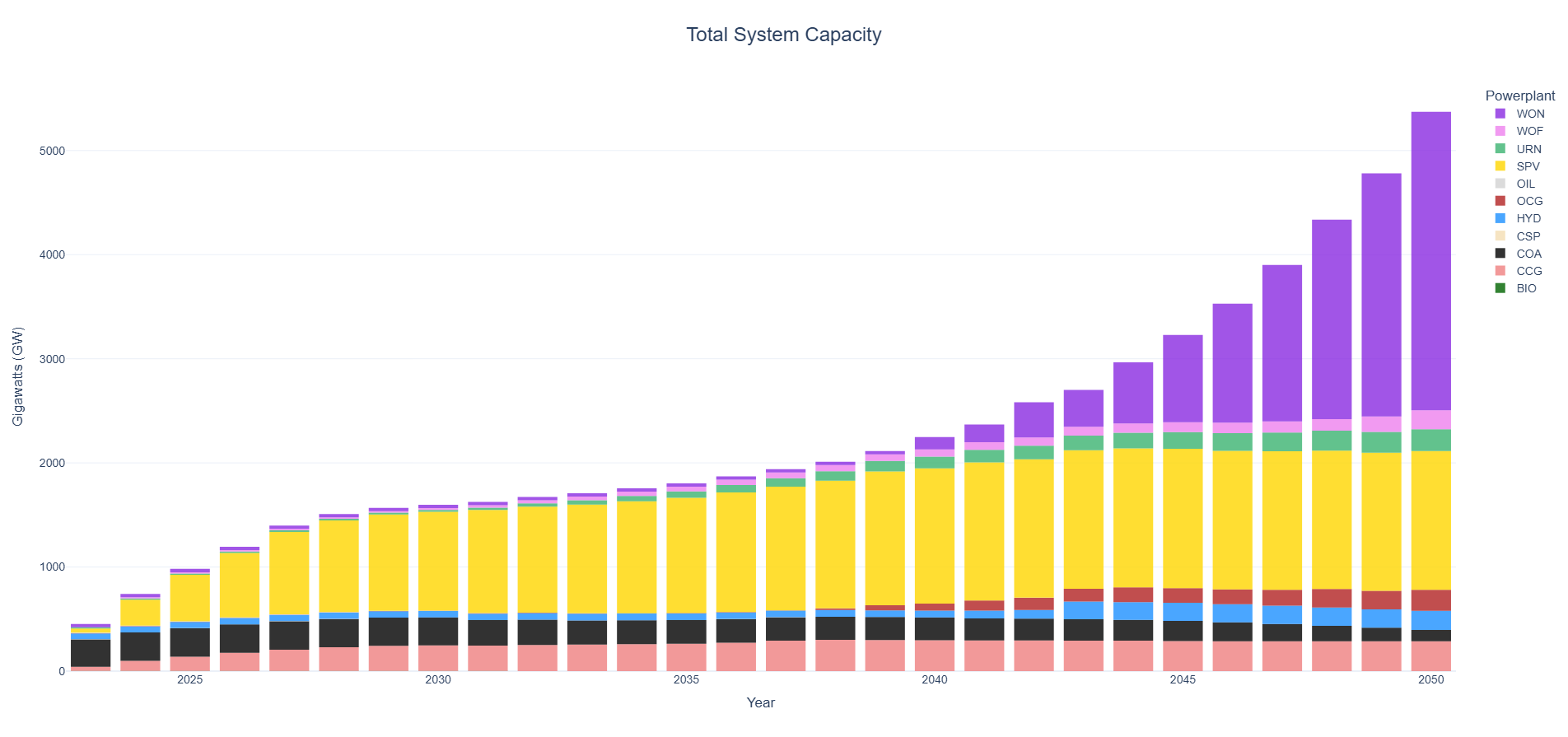
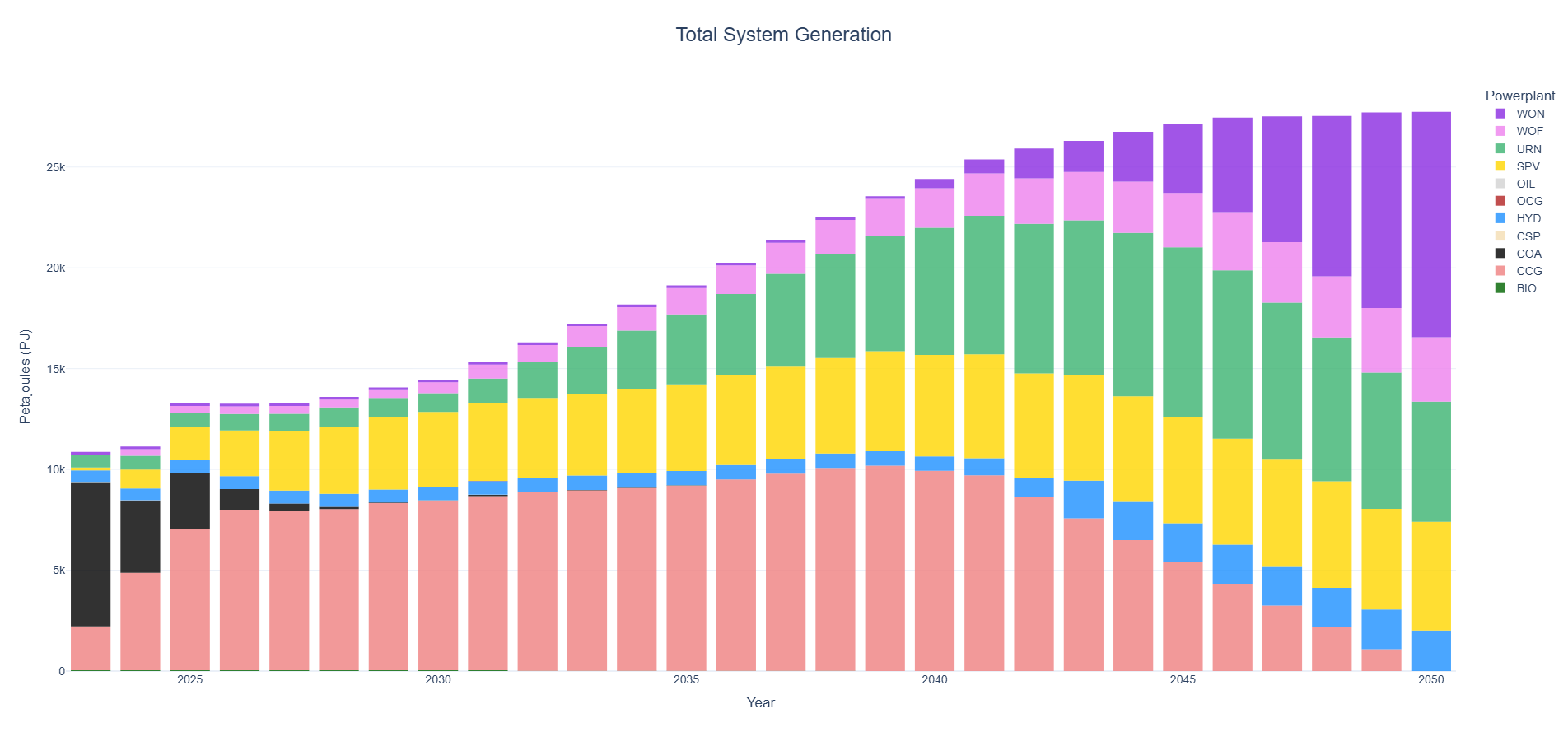
View system level capacity and generation results.
Tip
Have a look at
results\BBINtargets\result_summaries\GenerationSharesCountry.csvto see that the 30% renewable generation target in Bangladesh is met and have a look atresults\BBINtargets\results\TotalCapacityAnnual.csvto see that the 100 GW Onshore Wind in Southern India target is met.
Example 5#
Goal: Add electricity storage to the BBINtargets model.
The goal of this scenario will be to add a Short Duration Storage (SDS) battery technology and a Long Duration Storage (LDS) storage technology to the model. We will also add user defined capacities for storage.
Change the scenario name
scenario: 'BBINstorage8hourly'
Change the
storage_parametersparamater to includeSDSwith an assumed CAPEX cost of1938million dollar per GW, fixed cost of44.25million dollar per GW per yr, variable cost of0$ per MWh, a roundtrip efficiency of85% and a storage duration of4hours.Then include
LDSwith an assumed CAPEX cost of3794million dollar per GW, fixed cost of20.2million dollar per GW per yr, variable cost of0.58$ per MWh, a roundtrip efficiency of80% and a storage duration of10hours.storage_parameters: SDS: [1938, 44.25, 0, 85, 4] LDS: [3794, 20.2, 0.58, 80, 10]
Tip
The storage duration parameter sets the link between the ‘generator’ component of a storage technology and the ‘storage/reservoir’ component. In essence, by setting a duration of 10 hours, we assume that every GW of power rating equals 10 GWh of storage. In other words, it will take the storage technology 10 hours to fully charge or discharge.
Ensure the
storage_existingandstorage_plannedparameters are set toTruewhich tells the model to make use of storage data from the Global Energy Storage Database in terms of existing and planned storage capacities.storage_existing: True
storage_planned: True
Warning
OSeMOSYS Global requires technology names to be abbreviated in 3 letter codes (e.g. SDS, LDS). To make sure that the technology names as used in the Global Energy Storage Database are correctly transferred over into the workflow we need to define a correct technology mapping. This can be done in the
workflow\scripts\osemosys_global\storage\constants.pyfile.Add reserve margin contributions of the
SDSandLDStechnologies.reserve_margin_technologies: LDS : 70 SDS : 70
Run the command
snakemake -j6(osemosys-global) ~/osemosys_global$ snakemake -j6
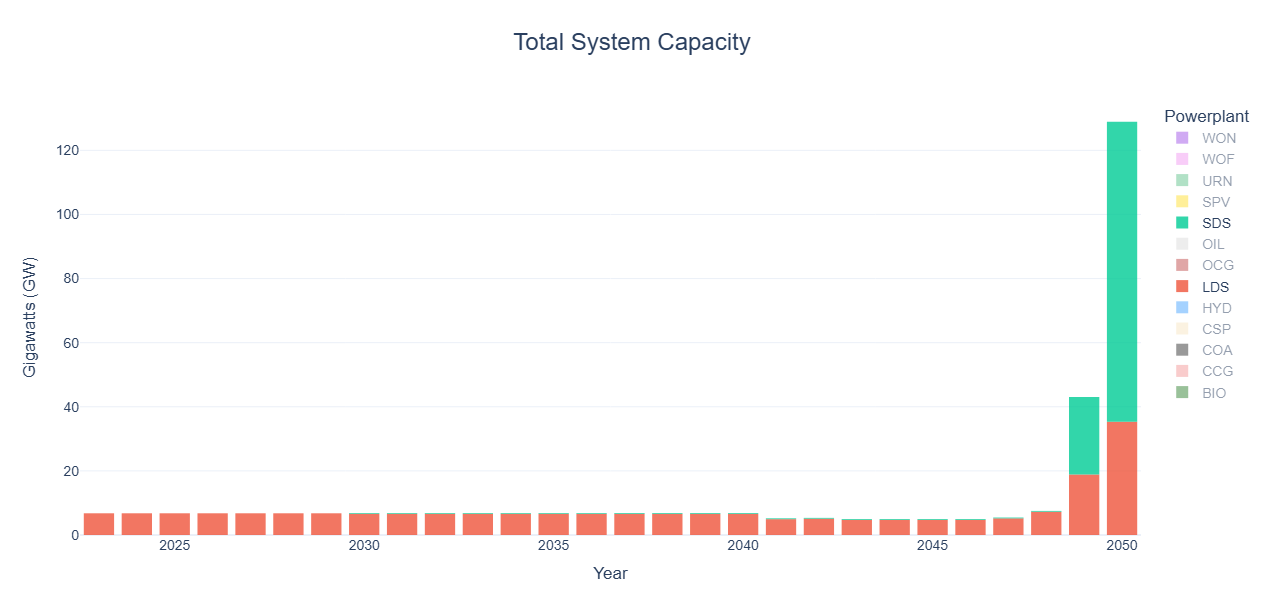
View system level capacity results for the storage technologies only.

Tip
By clicking on technologies in the legend, you can select or unselect entries on the interactive charts.
Change the scenario name
scenario: 'BBINstorage4hourly'
Change the number of day parts to represent 6 even 4 hour segments per day. The start number is inclusive, while the end number is exclusive.
dayparts:
  D1: [1, 5]
  D2: [5, 9]
  D3: [9, 13]
  D4: [13, 17]
  D5: [17, 21]
  D6: [21, 25]
Tip
Grab a coffee, this make take a little longer to run… More detailed dayparts and seasons can significantly increase model complexity and corresponding simulation time. On a common laptop while utilizing CBC as the solver it should take just over 20 minutes to solve.
View the system level capacity results to assess the impact of temporal resolution changes on the integration of electricity storage.
Example 6#
Goal: Add user defined capacities to the BBINstorage8hourly scenario.
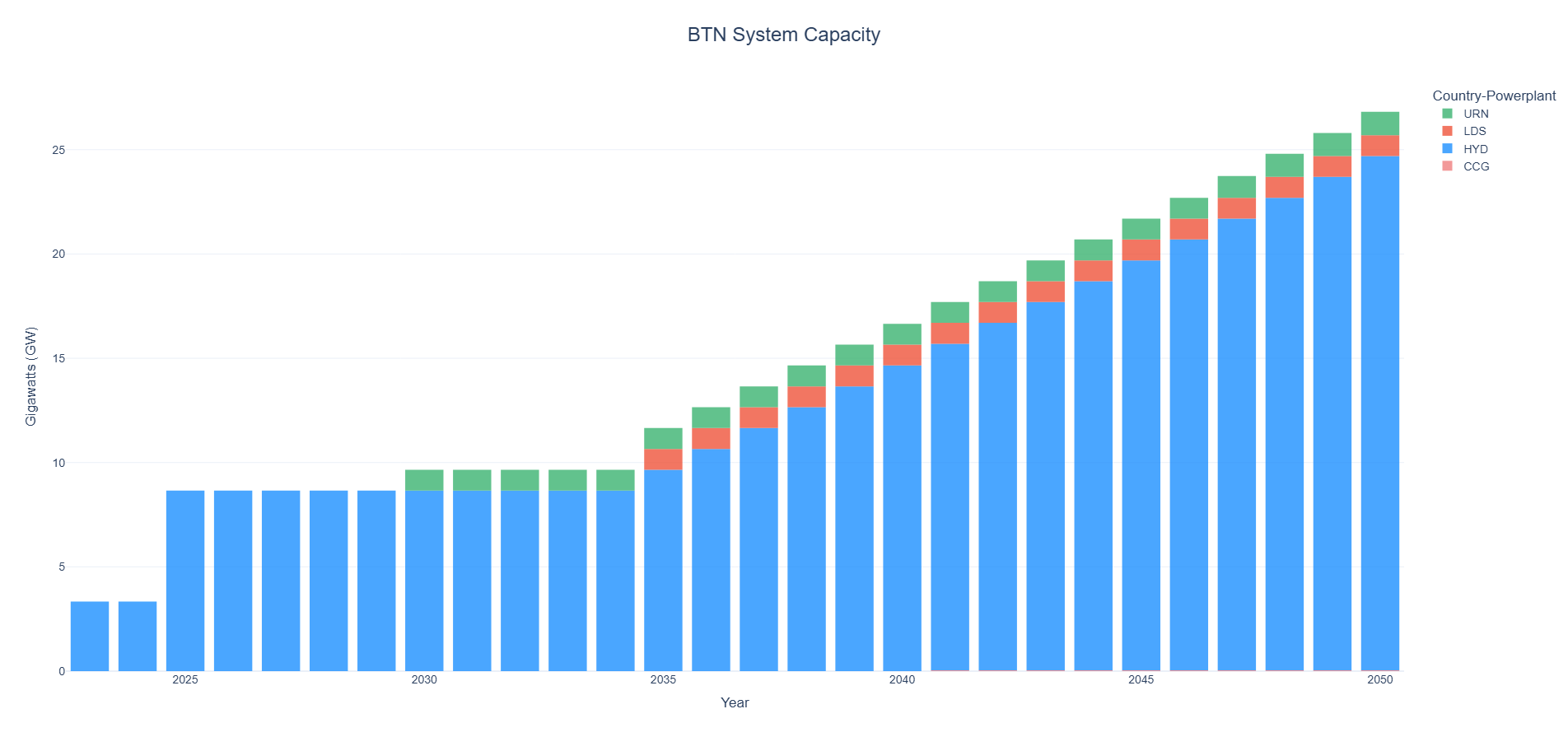
The goal of this scenario will be to add user defined capacities and parameters for power plants, storage and transmission. We will add a 1 GW Nuclear plant and a 3 GW Hydro plant to the system of Bhutan, a 3 GW transmission line between Bhutan and Eastern, India as well as a 1 GW LDS plant in Bhutan.
Change the scenario name
scenario: 'BBINuserdefined'
Change the number of day parts back to represent three even 8 hour segments per day. The start number is inclusive, while the end number is exclusive.
dayparts:
  D1: [1, 9]
  D2: [9, 17]
  D3: [17, 25]
Configure the new generators. We assume that the
3GWHYDplant comes online in2025and that the1GWURNplant comes online in2030. Furthermore, any new capacity afterwards can only be built starting in2035at max1GW per year with an associated CAPEX cost of1000million dollar per GW forHYDand4400forURNrespectively. The assumed efficiency for theURNtechnology is46%.user_defined_capacity: PWRHYDBTNXX01: [3, 2025, 2035, 1, 1000, 100] PWRURNBTNXX01: [1, 2030, 2035, 1, 4400, 46]
Caution
For any technology included in user_defined_capacity, the
capacityandbuild_yearparameters add residual capacity to the model for a given year. This is alongside residual capacities that are part of the default workflow or capacities that are entered inresources/data/custom/residual_capacity.csv. All other parameters overwrite the default values from the workflow (e.g. forefficiency) or substitute values defined elswhere (e.g. inresources/data/custom/powerplant_build_rates.csv).Tip
For any renewable technology that includes seasonality (i.e.
HYD,SPV,WONWOF) theefficiencyparameter in user_defined_capacity is not binding (needs to be set between 0-100%). Custom monthly (HYD) or hourly (SPV,WONWOF) capacity factors for these technologies can be defined inresources/data/custom. For example forSPVthis can be done inRE_profiles_SPV.csv.Configure the new LDS plant. We assume that the
1GWLDSplant comes online in2035with a further1GW per year allowed to be built in years after. Costs and efficiency parameters are kept equal to the default values forLDSas defined earlier instorage_parameterswithin (example 5).user_defined_capacity_storage: sto1: [PWRLDSBTNXX01, 1, 2035, 2035, 1, 3794, 20.2, 0.58, 80]
Caution
Similar as to user_defined_capacity, the parameters within user_defined_capacity_storage related to residual capacities will add capacities to the workflow whereas the other parameters will overwrite values defined elsewhere (e.g. in
resources/data/custom/storage_build_rates.csvor withinstorage_parameters).Configure the new transmission line. We assume that the
3GW line comes online in2030. Furthermore, we assume that an additional0.5GW per year can be built between2035and2050. Assumed CAPEX cost is433per GW, annual fixed O&M cost is15.2per GW per year, variable O&M cost (wheeling charge) is4$ per transmitted MWh and the assumed efficiency is96.7%.user_defined_capacity_transmission: trn1: [TRNBTNXXINDEA, 3, 2030, 2035, 2050, 0.5, 433, 15.2, 4, 96.7]
Tip
The
transmission_parametersparameter sets default values for common transmission technologies that can be adjusted by the user. For any potential transmission lines between default nodes, the OSeMOSYS Global workflow will automatically calculate costs and efficiency parameters that are distance and technology specific.Caution
Do NOT delete the entries within
transmission_parameters.Caution
Similar as to user_defined_capacity and user_defined_capacity_storage, parameters related to residual capacities will add capacities to the workflow whereas the other parameters will overwrite values defined elsewhere (e.g. in
resources/data/custom/transmission_build_rates.csvor withintransmission_parameters).Run the command
snakemake -j6(osemosys-global) ~/osemosys_global$ snakemake -j6
View the capacity results in Bhutan to see the effect of the user defined power plant and storage capacities.
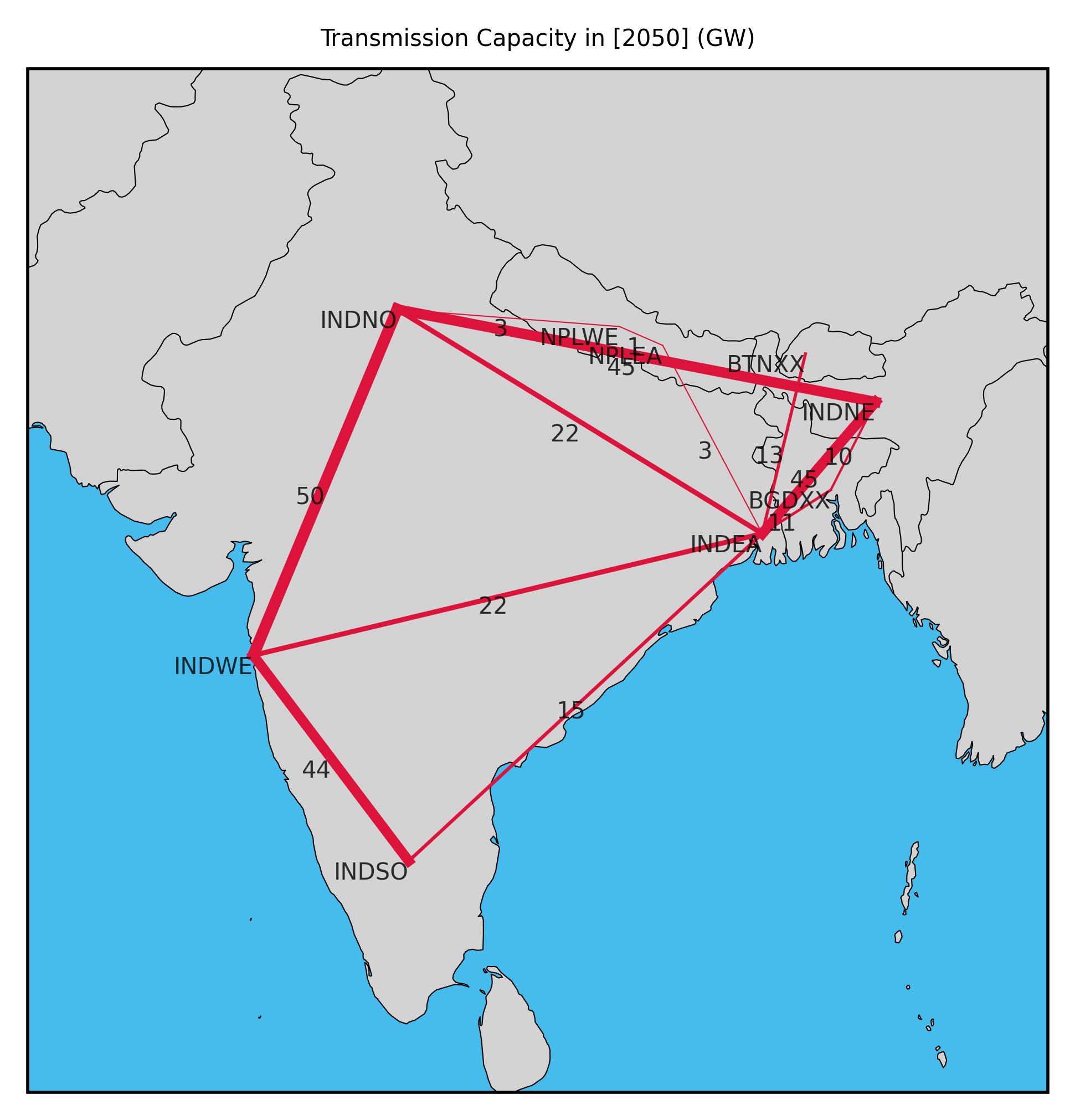
View the transmission capacity plot in 2050 by looking at the file
results/BBINuserdefined/figures/TransmissionCapacity2050.jpg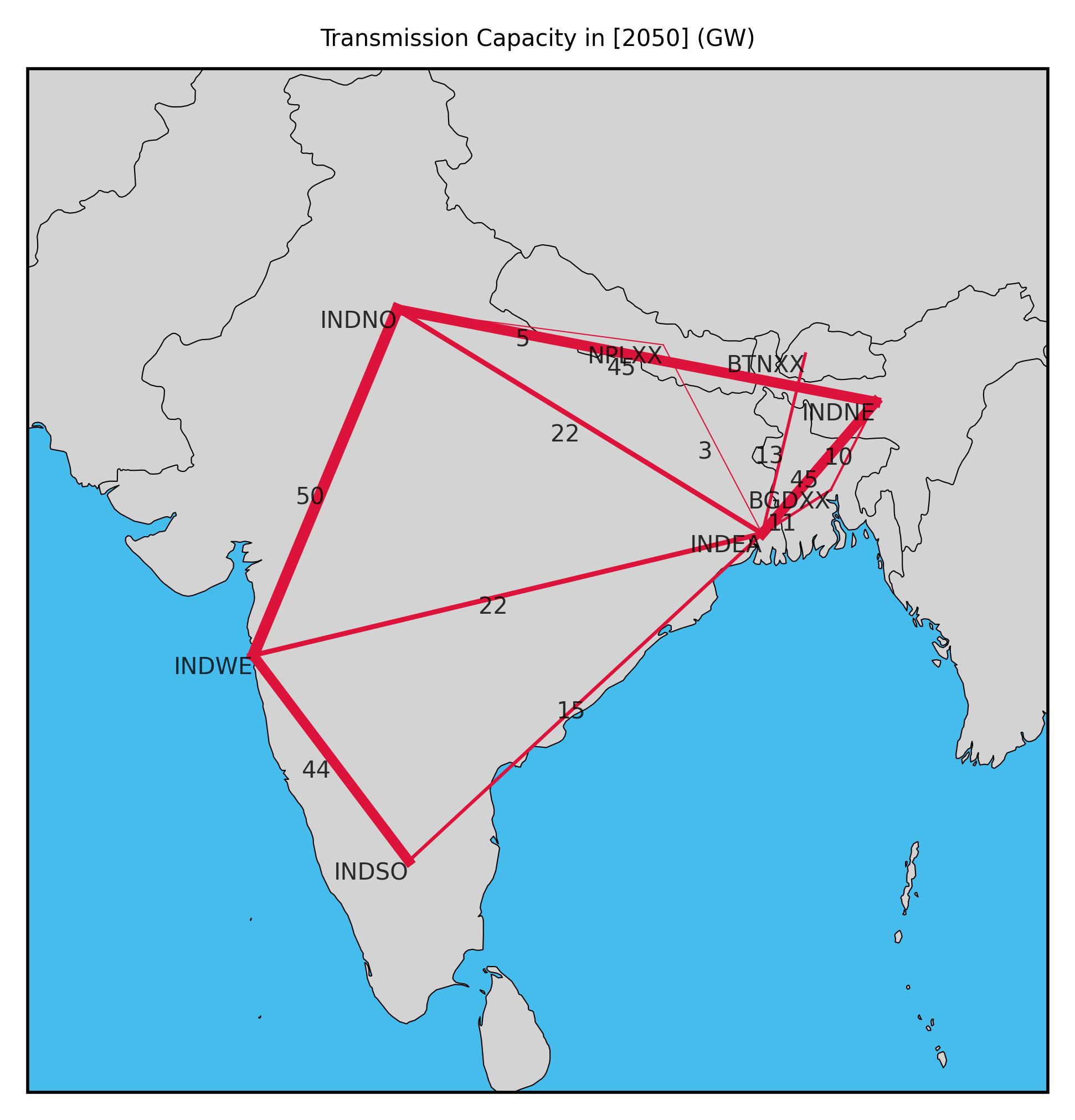
View the transmission flow plot in 2050 by looking at the file
results/BBINuserdefined/figures/TransmissionFlow2050.jpg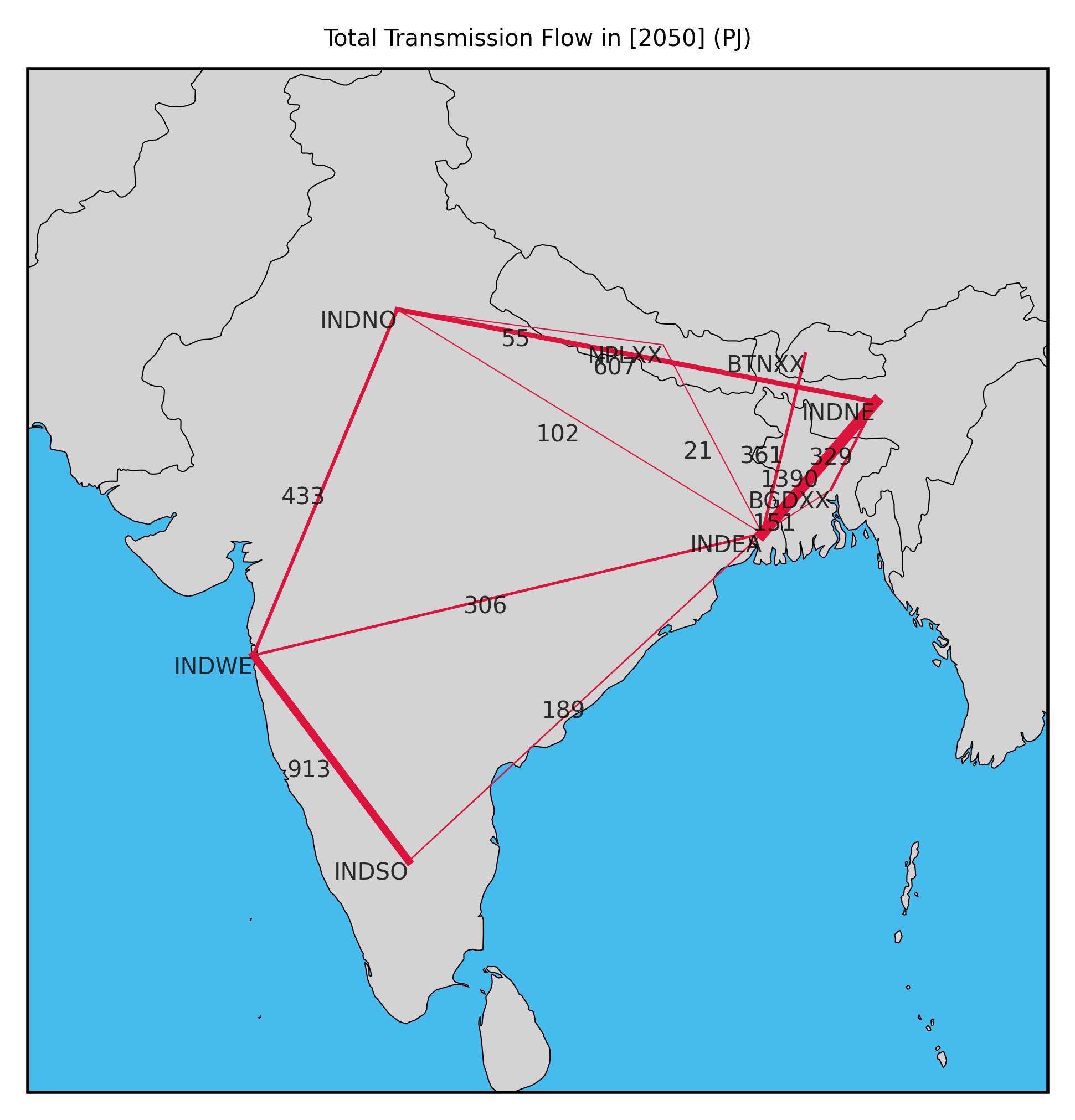
Example 7#
Goal: Add custom nodes to the model.
The goal of this scenario will be to alter the BBINuserdefined model by splitting Nepal into two seperate nodes being Eastern Nepal (NPLEA) and Western Nepal (NPLWE). We will add custom input data for the new model regions and will also add new transmission infrastruture between the new nodes as well as represent currently existing pathways between Nepal and other countries within BBIN.
Change the scenario name
scenario: 'BBINcustomregions'
Remove the country level node of Nepal from the model
nodes_to_remove: - "NPLXX"
Add the regional level nodes of Nepal to the model
nodes_to_add: - "NPLEA" - "NPLWE"
Warning
The custom nodes being added must start with the 3-letter code of the country that they are in (
NPLin this case). Only the 2-letter regional code can change.Caution
Do NOT delete
NPLfrom the geographic_scope.Add residual capacities in
resources/data/custom/residual_capacity.csv. The fuel type must be one of the existing fuels in the model (see here) with capacities inMW. Do not remove other entries in the file.CUSTOM_NODE
FUEL_TYPE
START_YEAR
END_YEAR
CAPACITY
NPLEA
HYD
2000
2080
1000
NPLWE
URN
2000
2060
1000
NPLWE
SPV
2025
2055
500
Add total resource potentials (
GW) for renewables inresources/data/custom/RE_potentials.csv. Do not remove other entries in the file.FUEL_TYPE
CUSTOM_NODE
CAPACITY
HYD
NPLEA
5
HYD
NPLWE
0
SPV
NPLEA
0
SPV
NPLWE
5
WON
NPLEA
0
WON
NPLWE
0
WOF
NPLEA
0
WOF
NPLWE
0
Note
For the purpose of this example, renewable potentials for other renewable technologies are set to
0for exemplary purposes. When letting e.g.WONto be built without defining capacity factor timeseries for the custom nodes (see below) you essentially allow for a fully ‘dispatchable’ wind technology to be constructed as the model by default assumes 100% availabilty unless otherwise defined.Add a monthly capacity factor timeseries for the
HYDplant inNPLEA. For the purpose of this example, copy the profile fromBTNXXand paste it into a new row. Set the NAME toNPLEA. Do not remove other entries in the file.NAME
M1
M2
M3
M4
M5
M6
M7
M8
M9
M10
M11
M12
BTNXX
45.6
45.8
46.8
52.4
66.3
80
80
80
80
56.9
46.4
45.7
NPLEA
45.6
45.8
46.8
52.4
66.3
80
80
80
80
56.9
46.4
45.7
Add an hourly capacity factor timeseries for the
SPVplant inNPLWEinresources/data/custom/RE_profiles_SPV.csv. For the purpose of this example, copy the profile fromBTNXXand paste it into a new column. Set the column header toNPLWE. Do not remove other entries in the file.Datetime
BTNXX
NPLWE
01/01/2015 0:00
0
0
01/01/2015 1:00
3.7
3.7
01/01/2015 2:00
12.7
12.7
01/01/2015 3:00
23.7
23.7
Note
Capacity factor profiles must be given for all hours in a single year. The data will then be aggregated according to the timeslice definition and replicated for each year.
Warning
The time-series for the example model are based on the 2015 climatic year. Profiles for different weather years can be used but the
Datetimeformat needs to remain the same. Furthermore, the input timeseries need to be set in UTC+0 considering OSeMOSYS Global has a global scope. As shown in (example 3), the timeshift parameter can be used to shift the input profiles to a timezone that is more relevant for the geographic_scope of the model in question.Add the annual electricity demand (
PJ) for the new nodes inresources/data/custom_nodes/specified_annual_demand.csv. For the purpose of this example, copy the rows fromBTNXXfor ALL years and paste it into a new set of rows. Rename the CUSTOM_NODE entries toNPLEA. Repeat the same exercise but now forNPLWE. Do not remove other entries in the file. The table below shows an example, however users are required to add values for ALL model years (2023-2050).CUSTOM_NODE
YEAR
CAPACITY
BTNXX
2021
9.5
BTNXX
2022
11.03
BTNXX
2023
12.58
NPLEA
2021
9.5
NPLEA
2022
11.03
NPLEA
2023
12.58
NPLWE
2021
9.5
NPLWE
2022
11.03
NPLWE
2023
12.58
Add the hourly specified demand profiles for the new nodes in
resources/data/custom_nodes/specified_demand_profile.csv. For the purpose of this example, copy the profile fromBTNXXand paste it into a new column. Set the column header toNPLEA. Repeat the same exercise but now forNPLWE. Do not remove other entries in the file.Month
Day
Hour
BTNXX
NPLEA
NPLWE
1
1
0
0.00012
0.00012
0.00012
1
1
1
0.00013
0.00013
0.00013
1
1
2
0.00013
0.00013
0.00013
Tip
For each year, the fractional demand profiles for each node must sum up to 1.
Add the center points of the new nodes in
resources/data/custom_nodes/centerpoints.csv. For Eastern Nepal we choose Kathmandu to be the center point and for Western Nepal we select Pokhara.
region |
lat |
long |
|---|---|---|
‘NPLEA’ |
27.700769 |
85.30014 |
‘NPLWE’ |
28.2096 |
83.9856 |
Tip
Center points in OSeMOSYS Global are used to calculate potential transmission distances between nodes. The default center points assume that transmission lines run between the largest population centers but users can make different assumptions. For example by picking geographical center points.
Following data from the Global Transmission Database existing and planned transmission capacity exists between Nepal and different parts of India. For the purpose of this study, we assume that Northern India is connected to Western Nepal and that Eastern India is connected to Eastern Nepal. We furthermore assume that a transmission line exists between Eastern and Western Nepal. Add the transmission objects to the model with the below assumptions. Do not remove the earlier defined transmission object.
user_defined_capacity_transmission: trn1: [TRNBTNXXINDEA, 3, 2030, 2035, 2050, 0.5, 433, 15.2, 4, 96.7] trn2: [TRNINDEANPLEA, 1, 2020, 2035, 2050, 0.5, 453, 15.9, 4, 96.4] trn3: [TRNINDEANPLEA, 2, 2028, 2035, 2050, 0.5, 453, 15.9, 4, 96.4] trn4: [TRNINDNONPLWE, 3, 2020, 2030, 2050, 0.5, 455, 15.9, 4, 96.4] trn5: [TRNNPLEANPLWE, 1, 2020, 2030, 2050, 0.5, 205, 7.2, 4, 99]
Warning
Following OSeMOSYS Global transmission naming standards, the name of a new transmission technology should be entered as
TRNplus the combination of the node names in alphabetical order. For exampleTRNINDEANPLEA.Tip
Multiple entries can be added for the same transmission object to represent residual capacities at different years. Note, this does require sequential key names (e.g. trn2, trn3).
Run the command
snakemake -j6
(osemosys-global) ~/osemosys_global$ snakemake -j6
View the transmission capacity plot in 2050 by looking at the file to confirm that the custom nodes and transmission lines haven been added.
results/BBINcustomregions/figures/TransmissionCapacity2050.jpg