
Contributing#
Welcome to OSeMOSYS Global’s contributor’s guide! The following information will help make contributing easy for everyone involved.
This document focuses on getting any potential contributor familiarized with the development processes, but other kinds of contributions are also appreciated. If you are new to using git or have never collaborated in a project previously, please have a look at contribution-guide.org. Other resources are also listed in the excellent guide created by FreeCodeCamp. Please notice, all users and contributors are expected to be open, considerate, reasonable, and respectful. When in doubt, Python Software Foundation’s Code of Conduct is a good reference in terms of behavior guidelines.
Thank you for contributing to OSeMOSYS Global!
Questions and Discussions#
If you have general questions or comments on the project, please submit them to our community discussion board. Maintainers and community collaborators will respond in the thread to ensure communication stays open and available for future reference.
Issue Reports#
If you experience bugs or general issues with OSeMOSYS Global, please have a look on the issue tracker. If you don’t see anything useful there, please feel free to file an issue report.
Tip
Don’t forget to include the closed issues in your search. Sometimes a solution was already reported, and the problem has been solved.
New issue reports should include information about your programming environment (e.g., operating system, Python version) and steps to reproduce the problem. Please try also to simplify the reproduction steps to a very minimal example that still illustrates the problem you are facing. By removing other factors, you help us to identify the root cause of the issue. There are four templates set up to help with this process:
- Bug Report
Issues relating to code/workflow errors
- Data
Issues relating to missing or incorrect data
- Documentation
Issues relating to documentation
- Feature request
Ideas to help us improve the project
Note
As with any project, OSeMOSYS Global is continually evolving and has bugs. If you encounter a bug, please don’t ignore it!
Documentation Improvements#
You can help improve OSeMOSYS Global docs by making them more readable and coherent, or by adding missing information and correcting mistakes.
OSeMOSYS Global’s documentation uses Sphinx as its main documentation compiler. This means that the docs are kept in the same repository as the project code, and that any documentation update is done in the same way was a code contribution. We use Markdown language with MyST extensions.
Tip
Please notice that the GitHub web interface provides a quick way of propose changes in OSeMOSYS Global’s files. While this mechanism can be tricky for normal code contributions, it works perfectly fine for contributing to the docs, and can be quite handy.
If you are interested in trying this method out, please navigate to the docs/ folder, find which file you would like to propose changes and click in the little pencil icon at the top, to open GitHub’s code editor. Once you finish editing the file, please write a message in the form at the bottom of the page describing which changes have you made and what are the motivations behind them and submit your proposal.
When working on documentation changes in your local machine, you cancompile them using tox. First install tox into your environmenmt:
(osemosys-global) $ pip install tox
Then build the documentation using tox
(osemosys-global) $ tox -e docs
Fianlly, use Python’s built-in web server for a preview in your web browser at http://localhost:8000
(osemosys-global) $ python3 -m http.server --directory 'docs/_build/html'
Tip
If you run into errors with building through tox, ensure you install cartopy’s dependencies as described here
Project Structure#
OSeMOSYS Global follows uses Snakemake to manage the workflow. Before contributing, please review the summary of the workflow and directory structure below.
Workflow Logic#
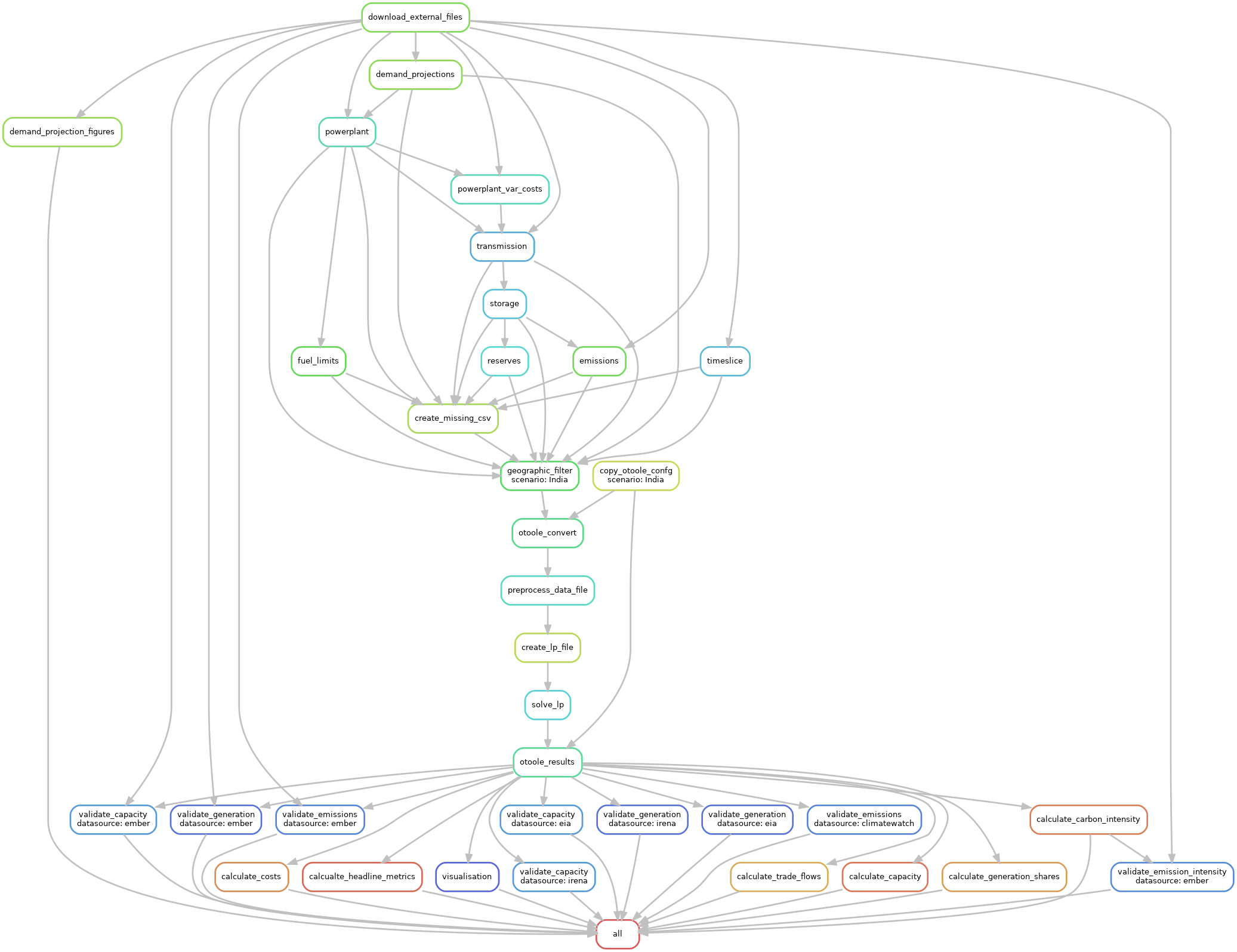
The OSeMOSYS Global workflow is shown below. Each rule (or job) is self documenting and can be found in the workflow/rules folder. The general workflow is:
The user inputs parameters into the configuration file and launches the workflow.
A series of Python scripts process the raw data into formatted scenario data based on the provided configuration options. The data structre follows
otooleformat.otooleis used to create an OSeMOSYS compatible datafileThe datafile and OSeMOSYS model file are processed by
GLPKto create a solver independent linear programming file.The model is solved by the user selected solver.
Solver results are processed by
otooleVisualization and validation charts are provided.
Directory Tree#
The directory structure of OSeMOSYS Global follows the recommended snakemake directory structure. The figure below highlights the structure and where contributors can look for information.
osemosys_global
├── config/
│   ├── config.yaml                # User configurable setup files
├── docs/                          # Files for documentation
├── resources/                     # Dependencies for the workflow
│   ├── data/                      # Data ingested by the workflow
│       ├── custom/                # User configurable data
│       ├── default/               # Default data (DO NOT TOUCH)
│       ├── validation/            # Data used for validation (DO NOT TOUCH)
│   ├── osemosys.txt               # OSeMOSYS Model File
├── resutls/                       # Will appear after running
│   ├── data/                      # Temporary data collection
│   ├── figs/                      # Global demand projection figures
│   ├── scenario_name/             # Results for your scenario
│       ├── data/                  # Input CSV data
│       ├── figures/               # Result figures
│       ├── results/               # OSeMOSYS varibale result CSV data
│       ├── result_summaries/      # Processed summarized results
│       ├── validation/            # Validation results
│       ├── scenario_name.txt      # Scenario data file
├── workflow/                      # All tools for the workflow
│   ├── envs/                      # Conda environemnts
│   ├── rules/                     # snakemake rules
│   ├── scripts/                   # Data processing scripts called by rules
│   ├── snakefile                  # snakefile
Code Contributions#
The following steps will walk through how to submit code changes.
See also
Before contributing, please see our installation instructions
1. Submit an Issue#
Before you work on any non-trivial code contribution it’s best to first create an issue ticket to start a discussion on the subject. This often provides additional considerations and avoids unnecessary work.
2. Install the osemosys-global Conda Environment#
Before you start coding, ensure you have followd the environment install instructions here. Active the osemosys-global environment with:
(base) $ conda activate osemosys-global
(osemosys-global) $
3. Fork and clone the repository#
Fork the project repository by clicking on the Fork button near the top of the page. This creates a copy of the code under your account on the repository service.
Clone this copy to your local disk:
(osemosys-global ) ~/repositories$ git clone https://github.com/<github_username>/OSeMOSYS/osemosys_global.git

(osemosys-global ) ~/repositories$ cd osemosys_global

(osemosys-global ) ~/osemosys_global$
4. Implement your changes#
Create a new branch with a name in the form of issue-### where ### is the auto assigned issue number from GitHub.
(osemosys-global) ~/osemosys_global$ git checkout -b issue-###
and start making changes. Never work on the main branch! Don’t forget to add docstrings to new functions, modules and classes. When you are done editing, push your changes.
(osemosys-global) ~/osemosys_global$ git add <MODIFIED FILES>

(osemosys-global) ~/osemosys_global$ git commit -m 'descripitve commit message'

(osemosys-global) ~/osemosys_global$ git push -u origin issue-###
5. Submit your contribution#
Go to the web page of your fork and click Create a Pull Request to
send your changes for review. Add yourself to the list of contributors in AUTHORS.md.
Tip
Find more detailed information in creating a PR. You might also want to open the PR as a draft first and mark it as ready for review after the feedbacks from the continuous integration (CI) system or any required fixes.